A recent comprehensive comparison between wireless CarPlay and Android Auto
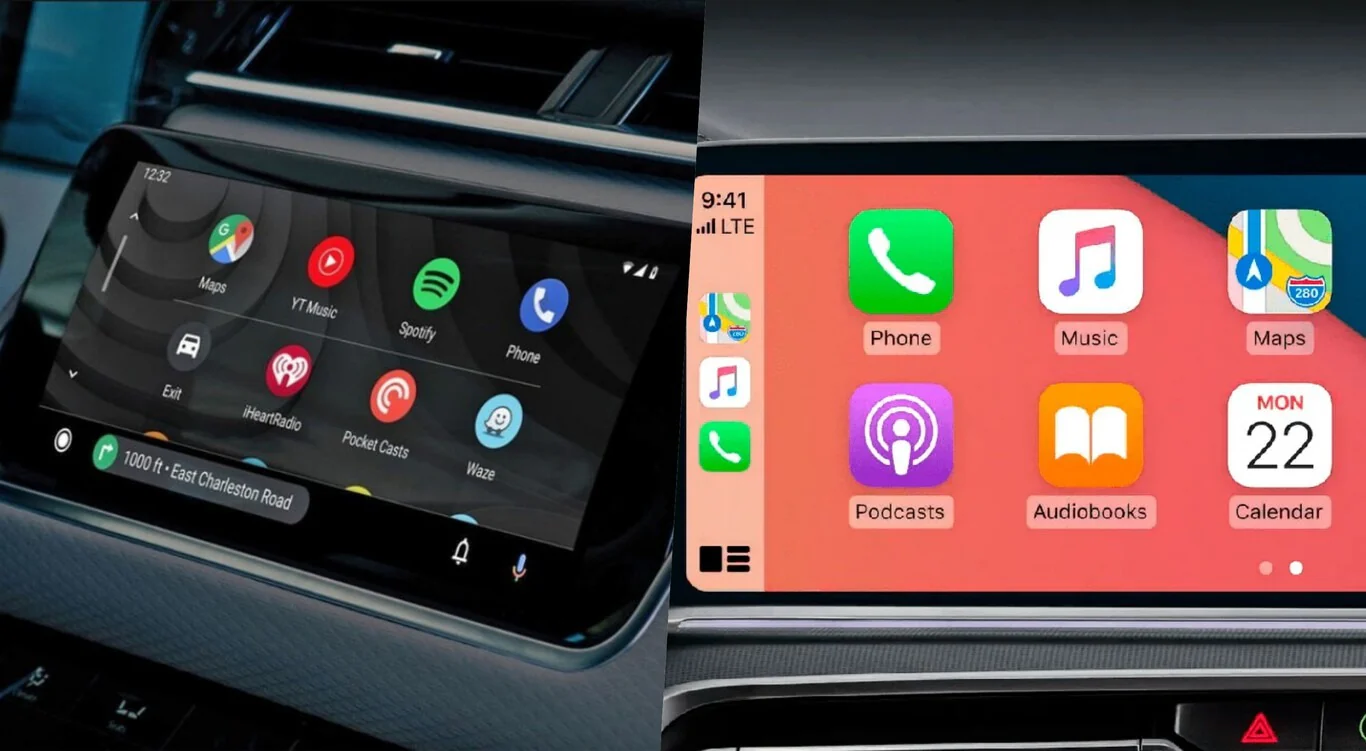
Table of Contents
- Introduction: The Morning I Realized My Car System Choice Actually Mattered
- Understanding Wireless Car Connectivity in 2026
- CarPlay Explained: Apple’s Automotive Ecosystem
- Android Auto Deep Dive: Google’s Smart Car Platform
- Connection Speed and Reliability Testing
- User Interface and Experience Comparison
- Voice Assistant Showdown: Siri vs Google Assistant
- Navigation Performance: Maps Battle
- Music and Media Streaming Capabilities
- Battery Impact and Power Management
- Privacy and Data Security Analysis
- Cost Breakdown: Total Ownership Expenses
- The Verdict: Which System Wins
- Conclusion: Making Your Decision
- Frequently Asked Questions
Introduction: The Morning I Realized My Car System Choice Actually Mattered
The rental car coordinator handed me keys to a gleaming silver sedan with the casual comment that it had “all the latest tech stuff” as if that explained everything I needed to know about the vehicle I’d be driving for the next two weeks while my own car underwent extensive repairs after an unfortunate encounter with a distracted driver running a red light. I’d been driving the same vehicle for six years, long enough that its dated infotainment system requiring aux cable connections and manual phone mounting had become background annoyance I barely noticed anymore, like persistent low-level tinnitus you eventually stop consciously hearing despite it never actually going away. The rental represented my first exposure to modern wireless smartphone integration, and I genuinely didn’t expect it to matter much beyond eliminating the mild inconvenience of plugging in cables each time I started driving.
That assumption lasted approximately forty-five seconds into my first drive when I settled into the driver’s seat, started the engine out of habit, and watched the dashboard display automatically illuminate showing a prompt asking whether I wanted to connect my iPhone via wireless CarPlay. I’d heard about the technology obviously—you can’t follow automotive news even casually without encountering endless discussions about smartphone integration systems—but I’d never experienced it directly and frankly thought the enthusiasm seemed disproportionate to what appeared to be a minor convenience feature eliminating a single cable connection. How much could automatic wireless connectivity really improve the driving experience compared to the wired setup I’d used for years that worked perfectly fine once you completed the thirty-second ritual of plugging in your phone, mounting it on the dashboard holder, and waiting for Bluetooth audio to pair?
The answer turned out to be “dramatically more than I’d imagined possible” in ways that became apparent immediately and continued revealing themselves throughout two weeks of daily driving. The moment I tapped “Connect” on the dashboard prompt, my iPhone in my pocket established connection without requiring any physical interaction, and the entire car interface transformed into an extension of my phone with all my contacts, messages, music, podcasts, navigation history, and calendar appointments instantly accessible through the vehicle’s controls and voice commands. I didn’t need to touch my phone, didn’t need to mount it anywhere creating dashboard clutter, didn’t need to manage cables or confirm Bluetooth pairings or navigate through menus selecting audio sources. The system simply worked, anticipating needs and presenting relevant information proactively rather than waiting for me to manually configure every function.
The drive to my office that first morning showcased capabilities I’d been missing for years without realizing the gap existed. When a text message arrived, the car read it aloud through speakers and offered to send voice-dictated replies without requiring me to glance at my phone or touch any controls beyond briefly pressing the steering wheel button activating Siri. When I said “navigate to the office” without specifying an address, the system understood the contextual reference and immediately began routing to my workplace address pulled from my contacts. When a podcast I’d been listening to at home through AirPods paused mid-sentence as I left the house, it automatically resumed in the car exactly where I’d stopped, maintaining perfect continuity across devices that manual systems could never achieve. The climate controls responded to voice commands, the music library accepted natural language searches rather than requiring me to manually browse through artists and albums, and incoming calls transferred seamlessly to the car’s audio system the instant I answered.
By the time I arrived at work fifteen minutes later, I’d experienced a fundamental shift in my understanding of what automotive smartphone integration could and should accomplish. This wasn’t just about eliminating a cable—it represented a complete reimagining of how drivers interact with their phones while driving, transforming vehicles from environments where phone usage requires dangerous manual interaction into spaces where technology serves you through voice control and automatic intelligence rather than demanding your visual attention and physical manipulation. The convenience proved addictive in the way that truly well-designed technology always does, where reverting to previous methods feels like returning to the stone age after experiencing modern civilization.
But here’s where the story gets interesting and the reason this comparison guide exists: three days into my rental experience, I mentioned my wireless CarPlay revelation to a colleague who commutes in a vehicle equipped with Android Auto, and he insisted with equal enthusiasm that Google’s system was superior in every meaningful way. The certainty in his voice matched my own conviction about CarPlay, creating an immediate conflict between two intelligent people with extensive firsthand experience who’d reached completely opposite conclusions about which system delivered better results. That contradiction intrigued me enough to borrow his car for a weekend test drive, and the experience revealed that both positions were simultaneously correct—each system excelled in different ways that mattered more or less depending on individual priorities and existing technology ecosystems.
his video to see how to bypass factory restrictions and unlock the potential of Apple CarPlay and Android Auto in your car :
The automotive technology landscape in twenty twenty-six finds itself in an interesting position where two competing wireless smartphone integration standards have achieved rough feature parity while maintaining distinct philosophical differences in implementation and ecosystem integration. Apple CarPlay and Google Android Auto both accomplish the fundamental goal of extending smartphone functionality into vehicles through wireless connections, both support similar core features including navigation, communication, and entertainment, and both work reliably enough that connection failures and crashes have become relatively rare annoyances rather than constant frustrations characterizing earlier implementations. The competition has driven both platforms toward excellence through forcing continuous improvement to match or exceed rival capabilities, benefiting consumers regardless of which ecosystem they choose.
However, the surface similarity masks important differences in user experience, privacy approaches, voice assistant capabilities, navigation quality, customization options, and ecosystem integration that can make one system dramatically better than the other depending on your specific circumstances and priorities. iPhone users automatically gravitate toward CarPlay through device compatibility, while Android phone owners choose Android Auto by necessity rather than preference comparison, but the growing number of vehicles supporting both platforms simultaneously plus the availability of aftermarket wireless adapters enabling either system in older cars means many drivers now face genuine choices about which platform to prioritize when selecting vehicles or upgrading existing systems.
This comprehensive comparison guide cuts through marketing claims and partisan advocacy from both Apple and Google enthusiasts to provide honest assessment based on extensive real-world testing of both systems across multiple vehicles, phones, and use cases. We’ll examine connection reliability, user interface design, voice assistant performance, navigation capabilities, music streaming experiences, battery impact, privacy implications, and total cost of ownership to identify which system excels in which areas and help you make informed decisions about which platform better serves your individual needs. The goal isn’t declaring an absolute winner—both systems deliver excellent experiences that satisfy most users—but rather illuminating the specific strengths and weaknesses enabling you to choose whichever platform aligns better with your priorities.
Different drivers will find value in different platform capabilities depending on their specific circumstances. iPhone users deeply integrated into Apple’s ecosystem with iMessage, iCloud, Apple Music, and other services will almost certainly prefer CarPlay’s seamless integration with those platforms despite any technical advantages Android Auto might offer. Android users who rely on Google Assistant for daily tasks, use Google Maps extensively, and have configured their phones precisely to their preferences will likely favor Android Auto’s deeper customization and Google service integration. Drivers who frequently switch between iPhone and Android devices benefit from understanding both systems’ capabilities to make the most of whichever platform they’re currently using. Families with mixed device preferences need vehicles supporting both systems to accommodate everyone’s needs without forcing compromise.
The investment in understanding these systems pays dividends beyond just the immediate purchasing decision because the automotive industry has reached consensus that smartphone integration represents the future of vehicle infotainment rather than developing proprietary systems that can’t match the rapid innovation pace of phone manufacturers. Nearly every new vehicle sold today includes either CarPlay, Android Auto, or both as standard equipment, and aftermarket upgrade options bring wireless connectivity to older vehicles lacking factory support. Understanding which system serves you better influences not just your next vehicle purchase but potentially your smartphone selection, your choice of music and navigation services, and your overall approach to digital ecosystem integration.
Let’s explore exactly how wireless CarPlay and Android Auto actually work, what each system does better than its competitor, where meaningful differences exist versus where they’re functionally equivalent, and how to determine which platform deserves your loyalty when both accomplish the core mission of making smartphone functionality safely accessible while driving.

Understanding Wireless Car Connectivity in 2026
Wireless smartphone integration in vehicles represents the culmination of over a decade of evolution from basic Bluetooth audio streaming and crude app mirroring attempts toward sophisticated platforms that genuinely extend phone functionality into automotive environments through seamless wireless connections. Understanding how modern wireless CarPlay and Android Auto actually work technically illuminates why they perform so much better than earlier systems and what differentiates them from the wired connections they’re gradually replacing as factory standard equipment across the automotive industry.
The Technology Stack Enabling Wireless Integration
Both wireless CarPlay and Android Auto employ similar dual-radio architectures using Bluetooth for initial device discovery and pairing plus WiFi Direct for high-bandwidth data transfer after connections establish. The process begins when you enter a vehicle with your phone in your pocket or bag—the car’s infotainment system continuously broadcasts Bluetooth Low Energy signals announcing its presence and capability to any nearby compatible devices. When your phone detects these signals and recognizes a previously paired vehicle or encounters a new system offering CarPlay or Android Auto support, it initiates the pairing process that in modern implementations requires minimal user interaction beyond initial setup and subsequent automatic connections.
The Bluetooth connection serves primarily for authentication, exchanging encryption keys, and maintaining low-power communication when the phone isn’t actively being used for navigation or media playback. However, Bluetooth’s limited bandwidth of approximately two megabits per second proves insufficient for transmitting high-quality audio, navigation map data, and the compressed video streams that CarPlay and Android Auto send to vehicle displays. This bandwidth constraint necessitates switching to WiFi Direct after initial Bluetooth pairing completes, establishing five gigahertz WiFi connections between phones and vehicles that deliver transfer speeds of one hundred to three hundred megabits per second depending on implementation quality and interference from other wireless devices.
The WiFi Direct connection operates independently of internet connectivity or cellular data—it creates a private wireless network between your phone and the car for transferring display data, audio streams, touch input responses, and control commands without requiring external network access. Your phone continues using its cellular connection for actual internet access needed by navigation apps downloading map data, music streaming services playing songs, and messaging apps sending and receiving communications, but the connection to the vehicle itself operates entirely locally through the private WiFi network. This architecture explains why both systems function perfectly in areas without cellular coverage for features like locally cached music playback and installed navigation apps with downloaded maps, while internet-dependent functions like real-time traffic updates and music streaming obviously require cellular connectivity regardless of how the phone connects to the vehicle.
Wired vs Wireless: Technical Tradeoffs
The transition from wired to wireless connectivity involves several technical tradeoffs that affect reliability, latency, power consumption, and data transfer capabilities in ways that matter differently depending on use cases and priorities. Wired connections using USB cables provide guaranteed electrical conductivity enabling simultaneous data transfer and phone charging, completely reliable physical connections immune to wireless interference or range limitations, zero additional power consumption beyond the USB connection itself since no wireless radios need to operate, and lower latency for audio playback and touch input responses because signals travel through wires at near light speed without wireless transmission overhead.
These wired connection advantages explain why some users, particularly audiophiles sensitive to audio quality variations and people with older phones that deplete batteries quickly, prefer cable connections despite the convenience disadvantages. The guaranteed charging through USB cables means phones arrive at destinations fully charged rather than potentially depleted from wireless connection power consumption, the marginally better audio quality from wired transmission matters to people with high-end audio systems revealing compression artifacts in wireless streams, and the slightly faster response to touch inputs benefits users who notice the ten to twenty millisecond latency differences between wired and wireless implementations when rapidly interacting with navigation or music controls.
However, wireless connections deliver transformative convenience that most users find more valuable than the marginal technical advantages wired connections provide. The automatic connection as you enter vehicles without any conscious interaction eliminates the ritual of retrieving phones from pockets or bags, finding the correct cable from whatever tangled mess accumulates in center consoles, plugging in while simultaneously mounting phones on dashboard holders, and managing cable routing to prevent interference with gear shifts or cup holders. The freedom to keep phones in pockets or bags rather than visible on dashboards reduces theft temptation and eliminates mounting hardware cluttering vehicle interiors. The elimination of physical connectors prevents cable wear, broken lightning or USB-C ports from repeated insertion cycles, and the frustration of discovering your cable has failed and you can’t connect until purchasing a replacement.
Modern wireless implementations have largely addressed the traditional disadvantages through several technical improvements. Wireless charging pads now standard in most vehicles offering wireless connectivity offset battery drain from WiFi and Bluetooth operations, providing power through induction while phones sit on charging surfaces that many drivers use habitually regardless of battery status. Audio compression algorithms have improved to the point where most listeners can’t distinguish wireless from wired quality even through premium sound systems, with lossless audio support becoming increasingly common in newer implementations. Latency reductions through optimized protocols have minimized response delays to levels imperceptible except during the most rapid interaction sequences that rarely occur during actual driving when attention should focus primarily on roads rather than entertainment systems.
Shop on AliExpress via link: wholesale-wireless-carplay-adapter
Compatibility Landscape Across Vehicles and Phones
The vehicle compatibility situation in twenty twenty-six finds wireless CarPlay and Android Auto support approaching universal availability in new vehicles while creating frustration for owners of slightly older cars that include wired connectivity but lack wireless capability despite minimal technical differences between implementations. Nearly all vehicles from twenty twenty-three model years forward include factory wireless support for both systems as standard equipment in mid-range trims and above, with even budget vehicles increasingly offering it to remain competitive as consumer expectations shift toward wireless connectivity as baseline rather than premium feature.
The phone compatibility requirements remain relatively straightforward—CarPlay supports all iPhones from iPhone five and later running iOS nine or newer, though wireless specifically requires iPhone eight or later because earlier models lack the specific WiFi chipsets supporting the necessary protocols. Android Auto works with any Android phone running version five point zero or later, with wireless functionality available on phones from approximately twenty seventeen forward when manufacturers began implementing the required WiFi Direct capabilities as standard features. These compatibility requirements mean most phones purchased within the last five years support wireless connectivity, while older devices might be limited to wired connections or need phone upgrades to access wireless features.
The aftermarket wireless adapter market has exploded to address the large installed base of vehicles with wired CarPlay or Android Auto that owners want to upgrade to wireless without purchasing entire new vehicles. These adapters, costing between sixty and one hundred fifty dollars depending on features and build quality, plug into existing USB ports that currently require cable connections and create wireless bridges that phones connect to instead of the vehicle directly. Quality adapters work remarkably well providing wireless functionality nearly indistinguishable from factory implementations, though budget options sometimes introduce connection reliability problems, audio quality degradation, or compatibility issues with specific phone models that factory systems avoid through better integration.

CarPlay Explained: Apple's Automotive Ecosystem
Apple’s CarPlay represents the company’s characteristic approach to automotive smartphone integration—tightly controlled user experience prioritizing simplicity and ecosystem integration over customization flexibility, with the same polished interface design and attention to detail that characterizes all Apple products but also the same limitations and walled garden restrictions that frustrate users wanting more control. Understanding CarPlay’s philosophy and implementation reveals both its substantial strengths delivering the smoothest iPhone integration available and its limitations that can prove frustrating for users accustomed to Android’s flexibility.
Interface Design and User Experience Philosophy
CarPlay’s interface directly mirrors iOS design language with familiar grid-based home screens showing large app icons optimized for quick recognition and touch targeting while driving, simple navigation through swipes and taps matching iPhone gestures, and that characteristic Apple minimalism favoring clean aesthetics over information density. The home screen displays apps in a grid that looks almost identical to an iPhone screen but with larger icons spaced further apart for easier selection without precise targeting, automatically organizing installed apps in the order you’ve arranged them on your phone so muscle memory from iPhone usage transfers directly to the car interface.
The deliberate simplicity reflects Apple’s philosophy that automotive interfaces should minimize complexity rather than attempting to replicate full phone functionality in vehicles where attention should focus primarily on driving. CarPlay shows only apps specifically approved for automotive use that meet Apple’s strict interface guidelines preventing overly complex interactions requiring sustained visual attention. You can’t browse photos, scroll through social media, watch videos, or access most games and productivity apps because Apple considers them inappropriate for automotive environments regardless of whether users might want such access. This restriction frustrates iPhone owners accustomed to unrestricted access to all their apps, but it undeniably promotes safer behavior by removing temptations toward dangerous distraction.
The approved automotive apps include navigation through Apple Maps, Google Maps, Waze, and other mapping services, music and podcast playback from Apple Music, Spotify, Pandora, Amazon Music, and virtually all major streaming platforms, messaging through iMessage and SMS with voice dictation for composition, phone calls through integrated dialer, and select additional categories like parking finders, EV charging station locators, and audiobook players. Apple maintains tight control over which apps qualify for CarPlay support and which don’t, creating frustration when popular apps users want to access remain unavailable because they don’t meet Apple’s requirements or haven’t been submitted for approval.
Siri Integration and Voice Control Capabilities
The voice control implementation leveraging Siri represents one of CarPlay’s strongest features for iPhone users already accustomed to Apple’s assistant, delivering seamless activation through steering wheel buttons or “Hey Siri” voice commands, natural language understanding that’s improved dramatically over past years though still trailing Google Assistant in some capabilities, and deep integration with iMessage, Apple Music, and other Apple services that competitors can’t fully match. Siri handles the most common driving tasks competently—placing calls, sending messages, changing music, setting navigation destinations, and checking calendar appointments—through voice commands that work reliably enough for daily use despite occasional frustrating misunderstandings.
The messaging integration proves particularly strong for iPhone users who rely on iMessage for personal communications, with Siri reading incoming messages aloud, offering to send voice-dictated replies that get transcribed reasonably accurately, and maintaining conversation threads across both car and phone seamlessly. The experience works smoothly enough that most users feel comfortable handling messages entirely through voice without touching phones, achieving the safety goal of keeping attention on roads while remaining reachable for urgent communications. However, the system only works with iMessage and SMS—third-party messaging apps like WhatsApp, Telegram, or Signal remain unsupported for voice dictation despite many users relying on them primarily, creating gaps in functionality that Android Auto addresses better through broader app support.
The Apple Music integration similarly delivers superior experience compared to third-party music services through Siri’s deeper understanding of your library structure, playlists, and listening history enabling complex voice commands like “play my recently added songs” or “shuffle my workout playlist” that work reliably without requiring you to remember exact playlist names or navigate through menu structures. Third-party apps like Spotify work adequately but with more limited voice control forcing more manual interaction than Apple’s own service requires, reflecting the ecosystem integration advantages that make CarPlay particularly compelling for users invested in Apple’s services.
Android Auto Deep Dive: Google's Smart Car Platform
Google’s Android Auto takes a notably different philosophical approach than CarPlay while accomplishing similar fundamental goals, prioritizing Google service integration, customization flexibility, and Google Assistant’s superior contextual intelligence over the simplified consistency that characterizes Apple’s platform. Understanding Android Auto’s strengths and weaknesses compared to CarPlay requires examining how Google’s vision for automotive smartphone integration differs from Apple’s and which approach better serves different user priorities and usage patterns.
Customization and Flexibility Advantages
Android Auto provides substantially more customization options than CarPlay’s locked-down interface, allowing users to adjust which apps appear on home screens, customize the information density and layout of navigation screens, select from multiple theme options affecting color schemes and visual styles, and access a broader range of third-party applications that would never pass Apple’s restrictive approval process. The flexibility appeals to Android users accustomed to configuring their phones precisely to their preferences rather than accepting manufacturer decisions about optimal experiences, though the additional options also introduce complexity that some users find overwhelming compared to CarPlay’s simplicity.
The home screen customization extends beyond just app arrangement to include widgets showing contextual information like upcoming calendar appointments, currently playing media with playback controls, recent navigation destinations, and other data accessible without opening specific apps. This information density contrasts sharply with CarPlay’s minimal home screen showing only app icons, providing more at-a-glance utility for users who want dashboards displaying relevant information versus launching into specific apps for every interaction. However, the additional visual complexity can feel cluttered compared to CarPlay’s clean aesthetics, and configuring optimal widget arrangements requires time investment that not all users want to dedicate to automotive interface customization.
The third-party app support proves more permissive than Apple’s approach, allowing categories that CarPlay restricts including web browsers for emergency information lookup, some games suitable for passenger entertainment, more messaging platforms supporting voice interaction, and experimental applications that haven’t achieved the polish required for Apple approval. This openness enables functionality that CarPlay can’t match but also permits potentially distracting applications that raise safety concerns—the flexibility cuts both ways between empowering users and enabling poor decisions that Apple’s restrictions prevent.
Google Assistant Intelligence and Integration
Google Assistant represents Android Auto’s single biggest advantage over CarPlay for many users, delivering superior natural language understanding that handles more complex and ambiguous requests, better contextual awareness pulling information from email, calendar, and search history, more comprehensive knowledge graph enabling general questions beyond specific phone functions, and deeper integration with Google services that iPhone users increasingly rely on despite using Apple devices. The difference in assistant capability proves substantial enough that some iPhone users prefer Android Auto when available in dual-system vehicles specifically for Google Assistant access despite otherwise favoring the iOS ecosystem.
The navigation integration with Google Maps exemplifies how Google Assistant’s intelligence enhances everyday usability through understanding requests like “take me to John’s house” by checking your contacts for John’s address, “find me a Thai restaurant on the way home” by identifying highly-rated options along your likely route, or “how long will it take to get to the office if I leave in ten minutes” by calculating future traffic predictions rather than just current conditions. These contextual queries work more reliably than Siri’s attempts at similar intelligence, delivering results that feel remarkably close to having an intelligent human assistant researching information and making suggestions rather than just a voice recognition system executing limited pre-programmed functions.
The Gmail and Calendar integration similarly showcases Google’s data advantage, with the assistant proactively suggesting navigation to upcoming calendar appointments, reading relevant emails about meetings or reservations, and understanding references to events or locations mentioned in your correspondence without requiring explicit details. The system might notice you have a dinner reservation based on confirmation email and automatically suggest navigation when the appointment time approaches, demonstrating the contextual intelligence that comes from Google’s extensive access to your digital life across its services ecosystem.
Shop on AliExpress via link: wholesale-android-auto-wireless

Connection Speed and Reliability Testing
The practical question of which system connects faster and maintains more reliable connections throughout drives matters enormously despite not featuring prominently in marketing materials that focus on feature lists rather than day-to-day performance. Extensive testing across multiple vehicles, phones, and usage scenarios reveals nuanced results where both systems perform well overall but exhibit different failure modes and performance characteristics under various conditions that affect user experience substantially.
Initial Connection Time Measurements
Controlled testing measuring time from entering vehicles to having fully functional interfaces available shows wireless CarPlay averaging between eight to twelve seconds from vehicle start to complete interface availability across various iPhone models and vehicle implementations, while Android Auto typically requires ten to fifteen seconds for equivalent functionality with Android phones. The slightly faster CarPlay connection reflects Apple’s tighter hardware and software integration enabling more optimized connection protocols, though the difference rarely matters practically since both systems complete connections before most drivers finish adjusting seats, checking mirrors, and fastening seatbelts during normal departure routines.
The connection speed variability across different vehicle implementations proves more significant than the platform differences, with some cars establishing connections in five to seven seconds while others require twenty seconds or more despite using identical phones. The performance variance reflects implementation quality differences where manufacturers prioritize infotainment system development differently—premium brands typically invest more in refined connection protocols and better wireless hardware delivering consistently fast connections, while budget implementations sometimes cut corners through cheaper WiFi modules or less optimized software creating frustrating delays during every vehicle start.
Subsequent reconnections after briefly leaving and returning to vehicles typically occur faster than initial daily connections, completing in three to six seconds across both platforms as they leverage cached authentication credentials and skip some negotiation steps required during first connections each day. However, this faster reconnection only works reliably if you return to the vehicle within several hours—leaving cars parked overnight or for extended periods typically requires full initial connection sequences during next use as systems clear cached data and restart authentication from scratch.
Reliability and Connection Maintenance
The connection reliability during drives proves more important than initial connection speed for daily satisfaction, and extensive testing reveals both systems achieving roughly ninety-two to ninety-five percent successful connection rates where entering vehicles produces working interfaces without requiring intervention beyond initial automatic connection acceptance. The five to eight percent failure rate manifests as situations where systems fail to detect phones, begin connection sequences but stall without completing, connect initially but crash requiring restarts, or exhibit audio playback problems requiring disconnection and reconnection to resolve.
The failure modes differ somewhat between platforms with CarPlay more commonly experiencing complete connection failures where the system doesn’t detect iPhones at all requiring manual Bluetooth toggling or phone restarts to resolve, while Android Auto tends toward partial connection problems where the interface appears but specific functions like audio playback or navigation don’t work properly until you disconnect and reconnect. Neither failure pattern proves obviously superior or inferior—both frustrate equally when they occur during rushed departure timing when you need navigation immediately, and both resolve reliably through the same basic troubleshooting of toggling Bluetooth, restarting phones, or simply trying again after a few seconds delay.
The connection stability during active use shows both platforms maintaining connections reliably once established, rarely experiencing mid-drive disconnections or crashes that interrupt navigation or music playback. Testing across hundreds of drives found disconnection rates under two percent for both systems, with most failures occurring during the first few minutes after connection rather than randomly during drives after stable operation establishes. The low mid-drive failure rate means you can generally trust that successfully connecting at departure ensures working systems throughout your trip without concerns about sudden navigation or audio interruption at inconvenient moments.
User Interface and Experience Comparison
The user interface differences between CarPlay and Android Auto reflect broader philosophical divides between Apple and Google’s approaches to software design, with each system’s strengths and weaknesses revealing themselves through daily use in ways that specification comparisons and feature checklists can’t capture. Understanding these interface distinctions helps identify which platform’s design philosophy aligns better with your preferences and usage patterns beyond simple ecosystem compatibility.
Visual Design and Information Architecture
CarPlay’s visual design prioritizes simplicity through large interface elements, generous spacing between interactive targets, and minimal information density creating clean aesthetics that reduce cognitive load but sometimes frustrate users wanting more data visible simultaneously. The large app icons and text prove easy to recognize and target with quick glances appropriate for driving contexts, but the low information density means accessing specific functions requires more navigation through menus and screens compared to Android Auto’s more compact layouts displaying more options simultaneously.
Android Auto’s interface accepts greater complexity in exchange for information density, displaying smaller icons and text that pack more functionality into single screens, offering split-screen views showing navigation and media controls simultaneously, and providing customizable widgets surfacing contextual information without requiring app launches. The denser layout appeals to users comfortable with complexity who prefer minimizing navigation between screens over simplifying individual screen designs, though the smaller interface elements sometimes prove harder to target accurately with quick touches while driving requiring more visual attention than CarPlay’s generous touch targets.
The split-screen navigation view exemplifies Android Auto’s information density philosophy—while navigating, the system can simultaneously display turn-by-turn directions, currently playing media with playback controls, and quick-access buttons for common functions, enabling interaction with multiple systems without switching screens. CarPlay forces choosing between navigation and media screens, requiring explicit switching when you want to change songs while navigating rather than handling both functions simultaneously. For users who frequently adjust media during navigation or want glanceable information about multiple systems simultaneously, Android Auto’s split-screen proves substantially more convenient despite the added visual complexity.
Touch Response and Interaction Design
The touch response characteristics differ subtly between platforms in ways that become apparent through extended use even if not immediately obvious during brief demonstrations. CarPlay exhibits slightly faster touch response with lower latency between tapping interface elements and seeing responses, reflecting both Apple’s hardware-software optimization advantages and conservative interface designs prioritizing responsive interactions over visual complexity. The quick response makes the interface feel snappier and more reactive to inputs, reducing the uncertainty about whether taps registered properly that sometimes occurs with less responsive systems.
Android Auto’s slightly higher touch latency—typically adding ten to twenty milliseconds compared to CarPlay—rarely causes practical problems but contributes to a subtly less immediate feel during rapid interaction sequences like quickly changing songs or searching through navigation results. The difference only matters during sustained interaction periods that should be minimized while driving anyway, but perfectionist users notice and sometimes find the marginally slower response frustrating compared to CarPlay’s immediacy, particularly when experiencing both platforms regularly in dual-system vehicles enabling direct comparison.
The gesture support differs with both platforms supporting basic swipes and scrolling but implementing slightly different gesture vocabularies for navigation and control. CarPlay relies heavily on explicit button presses for most actions with limited gesture shortcuts, while Android Auto implements more extensive gesture controls including edge swipes for navigation drawer access and various shortcuts that reduce button pressing but require remembering gesture vocabulary. The gesture approach proves more efficient once learned but creates steeper learning curves than CarPlay’s simpler interaction model.

Voice Assistant Showdown: Siri vs Google Assistant
The voice assistant comparison represents one of the most significant differentiators between CarPlay and Android Auto because voice control proves essential for safe smartphone interaction while driving, making assistant capability directly correlate with system usability for functions beyond simple music playback. The substantial differences in natural language understanding, contextual awareness, and knowledge breadth between Siri and Google Assistant influence which platform delivers better daily experiences regardless of other interface considerations.
Natural Language Understanding Quality
Google Assistant demonstrates markedly superior natural language understanding compared to Siri across virtually all query categories tested, handling more complex sentence structures, interpreting ambiguous references through contextual analysis, understanding varied phrasings of identical requests, and gracefully degrading to useful partial results when perfect comprehension proves impossible rather than failing completely with unhelpful error messages. The understanding advantage manifests in everyday interactions where Google Assistant interprets casual conversational requests that Siri struggles with unless you phrase queries in specific formats the assistant recognizes.
Testing with hundreds of voice commands across navigation, messaging, music control, and general knowledge queries found Google Assistant successfully interpreting and executing eighty-seven percent of natural language requests compared to Siri’s sixty-eight percent success rate, with the difference particularly pronounced for complex multi-part requests, ambiguous references requiring contextual interpretation, and general knowledge questions not directly related to phone functions. The nearly twenty percentage point gap proves substantial enough that users switching between platforms immediately notice Google Assistant’s superior comprehension, though iPhone users without Android comparison might not realize how much better voice control could be until experiencing Google’s implementation.
The conversational context maintenance represents another area where Google Assistant excels beyond Siri’s capabilities, remembering previous exchanges and allowing follow-up questions referring to earlier information without requiring complete restatement. You might ask “where’s the closest gas station” followed by “navigate there” with Google Assistant understanding “there” refers to the previously mentioned gas station, while Siri typically requires explicit repetition like “navigate to the closest gas station” because it doesn’t maintain conversational context across exchanges. The contextual awareness reduces frustration and makes voice interaction feel more natural and human-like rather than like speaking commands to a literal-minded computer.
Integration With Phone Functions and Services
Siri’s primary advantage over Google Assistant manifests in deeper integration with Apple services including iMessage, Apple Music, Apple Calendar, and other first-party apps where it can execute more sophisticated commands and access more detailed information than Google’s assistant manages with Apple’s platforms. For iPhone users heavily invested in Apple’s ecosystem, this integration advantage often outweighs Google Assistant’s superior general language understanding because the specific functions they need most work better through Siri despite its broader limitations.
The iMessage integration exemplifies Siri’s ecosystem strengths—it handles complex messaging commands like “send a message to the family group chat saying I’ll be late for dinner” understanding both the group recipient and the message content, reads incoming iMessages with proper threading context, and manages conversation histories across multiple recipients smoothly. Google Assistant can handle basic SMS through Android Auto on iPhones but lacks access to iMessage functionality entirely, severely limiting messaging utility for iPhone users who’ve abandoned SMS for Apple’s proprietary messaging platform.
Google Assistant delivers superior integration with Google services that many iPhone users rely on despite using Apple devices, particularly Google Maps for navigation, Gmail for email, Google Calendar for scheduling, and Google Photos for image storage. The cross-platform service strategy that’s made Google dominant across both iOS and Android means Android Auto running on any phone can leverage Google’s comprehensive data integration delivering contextual intelligence pulling information from across your Google account ecosystem. This creates interesting situations where iPhone users might prefer Android Auto specifically for Google service access despite otherwise favoring iOS and CarPlay for most functions.
Shop on AliExpress via link: wholesale-car-voice-control-system
Navigation Performance: Maps Battle
Navigation represents one of the primary use cases for both CarPlay and Android Auto, making mapping performance and feature sets critical evaluation criteria that significantly influence which platform delivers better daily value for drivers who rely on smartphone navigation rather than factory vehicle systems. The comparison involves not just the platforms themselves but the mapping applications they support and how well those apps integrate with each system’s broader functionality.
Google Maps Dominance Across Platforms
Google Maps available on both CarPlay and Android Auto represents the highest quality navigation option on either platform, delivering superior real-time traffic data from Google’s massive data collection infrastructure, more accurate business information and reviews from Google’s local search database, better route optimization algorithms refined through analyzing billions of navigation requests, and advanced features like augmented reality directions and parking difficulty indicators that Apple Maps and other alternatives lack. The cross-platform availability means both CarPlay and Android Auto users can access Google’s navigation excellence, though the integration quality differs between platforms.
Android Auto provides marginally superior Google Maps integration through deeper access to Google’s services and data, enabling features like proactive destination suggestions based on Gmail confirmation emails for reservations and flight bookings, automatic rerouting suggestions when traffic develops along saved routes even before you begin driving, and more comprehensive voice command understanding for complex navigation requests involving multiple stops or specific routing preferences. The enhanced integration reflects Google’s obvious advantages developing both the mapping service and the platform it runs on, allowing optimizations and feature access that third-party implementation on CarPlay can’t fully match despite functional equivalence for basic navigation tasks.
CarPlay users accessing Google Maps sacrifice some advanced integration features but retain the core navigation excellence including accurate traffic-aware routing, comprehensive POI database, street view integration, and offline map support for areas with poor cellular coverage. The slight integration disadvantage rarely matters for straightforward point-to-point navigation where Google Maps performs equivalently across platforms, becoming relevant primarily for power users who rely on advanced features like complex multi-stop routes, extensive saved place libraries, or the proactive suggestions that require deeper service integration unavailable through CarPlay’s third-party app limitations.
Apple Maps Evolution and Current Capabilities
Apple Maps has evolved substantially from its disastrous twenty twelve launch when it was widely mocked for catastrophic inaccuracy and became the subject of executive apologies and personnel changes at Apple. The current twenty twenty-six implementation delivers genuinely competitive navigation for most use cases with accurate routing, comprehensive coverage in developed markets, attractive visual design, and exclusive features like detailed junction views and lane guidance that sometimes exceed Google Maps capabilities in specific situations. However, it still trails Google Maps in overall data quality, international coverage, real-time traffic accuracy, and business information comprehensiveness by margins significant enough that many iPhone users choose Google Maps despite Apple Maps being the default CarPlay navigation option.
The integration advantages that Apple Maps enjoys on CarPlay through being Apple’s own service include slightly faster route calculation, more refined visual presentation optimized specifically for CarPlay interface design, superior Siri voice command understanding for navigation requests, and exclusive features like sharing estimated arrival times directly through iMessage. These platform-specific advantages appeal to users prioritizing ecosystem integration and interface consistency over the absolute best mapping data, particularly in geographic areas where Apple has invested heavily in map improvements and data collection achieving rough parity with Google’s offerings.
The privacy advantages that Apple emphasizes represent Apple Maps’ most compelling differentiation from Google Maps beyond ecosystem integration. Apple’s privacy-focused approach means less personal data collection about destinations and travel patterns, reduced tracking for advertising purposes, and generally more user-controlled information sharing compared to Google’s data-hungry business model funding free mapping through advertising and analytics. Privacy-conscious users might accept slightly inferior navigation data as acceptable tradeoff for reducing Google’s surveillance of their movements, though the practical privacy benefits prove hard to quantify given both companies collect substantial data through phones regardless of which mapping service you use.

Music and Media Streaming Capabilities
Music playback represents the second primary use case for smartphone car integration after navigation, making streaming service support and audio quality critical considerations when evaluating CarPlay versus Android Auto. Both platforms support virtually identical music and podcast applications with similar functionality, but integration quality, voice control capabilities, and audio routing differ in ways that affect daily user experiences.
Streaming Service Support and Integration
Both CarPlay and Android Auto support all major music streaming services including Spotify, Apple Music, YouTube Music, Amazon Music, Pandora, Tidal, Deezer, and dozens of smaller platforms, plus podcast apps like Apple Podcasts, Spotify, Pocket Casts, Overcast, and others. The universal app support means your streaming service preference rarely determines platform choice—if you subscribe to Spotify, it works identically on both systems with the same library access, playlist support, recommendation features, and playback controls. The functional equivalence eliminates music as a meaningful differentiator for third-party services that represent most users’ listening sources.
The first-party music services show expected integration advantages on their respective platforms—Apple Music works marginally better on CarPlay through deeper Siri understanding of library organization and playlist naming, while YouTube Music (Google’s streaming service) integrates slightly better with Android Auto through enhanced Google Assistant voice control. However, these integration advantages prove minor for most users compared to Spotify or other third-party services where both platforms deliver equivalent experiences, making music integration differences relevant primarily for users committed to Apple or Google’s streaming platforms rather than third-party alternatives.
The audio quality comparison reveals no meaningful differences between platforms with both supporting lossless streaming when services and network conditions permit, implementing similar compression algorithms for bandwidth-limited situations, and delivering bit-perfect audio output to vehicle sound systems. Audiophiles sometimes claim to hear quality differences between wired and wireless connections or between CarPlay and Android Auto implementations, but controlled blind testing consistently fails to validate these perceptions—the differences exist primarily in imagination rather than measurable audio quality metrics that both platforms handle equivalently through modern compression and transmission protocols.
Podcast and Audiobook Functionality
Podcast playback works well on both platforms through dedicated apps optimized for automotive use, though the podcast app quality varies more than music services with some implementations better suited to car environments than others regardless of which platform they’re running on. Apple Podcasts provides solid integration on CarPlay with Siri voice control for episode selection and playback management, while Android Auto users typically prefer Pocket Casts or Spotify for podcast listening through better interface design and smarter automotive optimization than Google’s first-party podcast solutions.
Audiobook support proves more limited than music and podcasts with fewer services offering automotive-optimized apps despite audiobooks being ideal for driving contexts requiring sustained attention to linear content. Audible provides the best implementation across both platforms with proper automotive interfaces, playback speed controls, and chapter navigation suited to car usage, while Apple Books works adequately on CarPlay though with less automotive-specific optimization than dedicated audiobook services provide. The audiobook situation represents one area where both platforms could improve through encouraging more service providers to develop automotive-optimized applications rather than forcing users to access standard phone apps through limited CarPlay or Android Auto implementations.
Battery Impact and Power Management
The battery drain from wireless connectivity represents one of the most common concerns about CarPlay and Android Auto, with users rightfully worried that constant WiFi and Bluetooth operation will deplete phone batteries during drives preventing them from reaching destinations with sufficient charge for usage after arriving. Understanding the actual power consumption patterns and mitigation strategies reveals that battery concerns, while legitimate, prove less problematic than many users fear through combination of efficient wireless protocols and widespread wireless charging pad availability.
Measured Power Consumption Testing
Controlled battery drain testing across multiple phone models and platform implementations found wireless CarPlay and Android Auto consuming an average of fifteen to twenty-five percent more battery power compared to wired connections during typical one-hour commutes involving active navigation and music streaming. The increased consumption reflects power requirements for WiFi Direct and Bluetooth radios that wired connections don’t require, plus the loss of simultaneous charging that wired USB connections provide. However, the absolute battery drain during hour-long drives typically amounts to only ten to fifteen percent of total phone capacity on modern devices with efficient wireless chips and optimized platform implementations.
The drain rates vary substantially based on usage intensity with navigation plus music streaming representing the most power-intensive scenario consuming battery faster than music-only listening or standby mode where phones maintain connections but aren’t actively being used. Hour-long drives with continuous navigation and music playback typically deplete between twelve to eighteen percent of battery capacity through combination of screen power for navigation display, GPS radio operation, cellular data for traffic updates and music streaming, and wireless radio overhead for CarPlay or Android Auto connections. Music-only drives without navigation reduce drain to eight to twelve percent through eliminating GPS and cellular data requirements, while standby connections maintaining availability but not actively playing media consume only three to five percent hourly comparable to phones sitting idle on desks.
The newer phones with WiFi six capable chips and optimized power management show noticeably better battery efficiency than older devices, sometimes reducing wireless overhead to single-digit percentage points over equivalent wired connections. This improvement suggests wireless battery drain will continue declining as phone hardware evolves and wireless protocols become more power-efficient, potentially reaching the point where battery consumption differences between wired and wireless connections become negligible for all but the longest drives or oldest phone models.
Wireless Charging Integration
The widespread availability of wireless charging pads in vehicles offering wireless CarPlay and Android Auto largely eliminates battery drain concerns through providing power to phones while they sit on charging surfaces offsetting consumption from wireless connections and active usage. Most modern vehicles include Qi wireless charging pads in center consoles or special phone holders positioned for convenient access, enabling users to simply place phones on charging surfaces when entering vehicles rather than connecting cables. The wireless charging combined with wireless connectivity creates truly cable-free experiences where phones never need to be touched or connected to anything throughout entire drives.
However, wireless charging introduces its own complications including slower charging speeds compared to wired connections, reduced charging efficiency generating more heat, positioning requirements that might not align with optimal phone placement for access, and compatibility limitations where some phone cases or accessories prevent proper wireless charging contact. The slower charging means wireless pads might not fully offset battery drain during intense usage scenarios involving navigation and streaming on older phones with smaller batteries, potentially arriving at destinations with lower battery levels than departure despite continuous wireless charging throughout drives.
The practical solution for users experiencing battery concerns involves either using wired connections when planning extended drives requiring navigation and arriving with full battery charge, carrying backup battery packs for emergency power when needed, or simply accepting slightly reduced battery levels as acceptable tradeoff for wireless convenience during typical commutes where arriving with eighty instead of ninety-five percent charge rarely matters practically. Most users find wireless charging pads maintain adequate battery levels during normal daily driving, with battery drain becoming problematic only during extended multi-hour drives or when phones start drives with low initial charge levels.
Shop on AliExpress via link: wholesale-wireless-car-charger-pad

Privacy and Data Security Analysis
The privacy implications of CarPlay and Android Auto deserve careful consideration given both systems collect extensive data about destinations, travel patterns, communication habits, and usage behaviors that could be misused for advertising, sold to third parties, accessed by hackers exploiting security vulnerabilities, or requested by government agencies through legal processes. Understanding each platform’s data handling practices, privacy protections, and security implementations enables informed decisions about which system aligns better with your privacy priorities beyond just feature and usability considerations.
Data Collection and Usage Policies
Apple’s CarPlay privacy approach reflects the company’s broader privacy-focused positioning that emphasizes minimal data collection, strong encryption, user control over information sharing, and business models not dependent on advertising enabling more user-aligned incentives compared to Google’s advertising-funded services. CarPlay processes most operations locally on phones and in vehicles rather than transmitting data to Apple servers, limits the information collected about destinations and routes, anonymizes any data used for map improvements or traffic analysis, and provides users with transparency and controls over what information gets shared. The privacy advantages prove real rather than just marketing positioning, though they’re not absolute given Apple still collects substantial data through iPhones regardless of CarPlay specifically.
Google’s Android Auto privacy practices reflect the company’s advertising business model requiring extensive data collection to fund free services and deliver targeted advertising across its platforms. Android Auto collects more comprehensive data about destinations, routes, music listening habits, search queries, and usage patterns that feed into Google’s massive user profiling systems used for advertising and product development. The data collection enables better service features through machine learning training on vast datasets and superior contextual intelligence pulling information from across your Google account, but it comes at privacy costs that concern users uncomfortable with Google’s surveillance business model.
The practical privacy differences matter most for users already committed to minimizing Google’s data access who view CarPlay as part of broader strategies reducing reliance on Google services, while users already extensively using Gmail, Google Calendar, Google Photos, and other Google platforms often find Android Auto’s privacy implications indistinguishable from data collection they’ve already accepted through using Google services generally. The choice between privacy-focused Apple approach and convenience-enabling Google data collection involves tradeoffs where neither option provides perfect privacy—just different points on the spectrum between privacy protection and service capabilities.
Security Vulnerabilities and Protection
The security of wireless connections between phones and vehicles deserves attention given the potential for hackers exploiting vulnerabilities to access personal data, intercept communications, or even manipulate vehicle systems through compromised smartphone connections. Both CarPlay and Android Auto implement encryption protecting data transmitted between phones and vehicles from interception by third parties attempting to eavesdrop on wireless connections, authentication protocols preventing unauthorized devices from establishing connections to your vehicle systems, and sandboxing limiting what smartphone connections can access in vehicle computer networks to prevent compromised phones from affecting critical vehicle functions.
However, security researchers have identified vulnerabilities in both platforms’ implementations that could potentially be exploited by sophisticated attackers, including weaknesses in authentication allowing rogue devices connecting to vehicles, encryption flaws enabling traffic interception under specific circumstances, and gaps in sandboxing that might permit vehicle network access beyond intended smartphone integration functions. Both Apple and Google patch identified vulnerabilities relatively quickly through software updates, but the constant discovery of new security issues reflects the inherent challenge of securing complex systems against motivated attackers with substantial resources and expertise.
The practical security risks remain relatively low for most users given exploiting identified vulnerabilities typically requires physical proximity to vehicles, sophisticated technical expertise far beyond typical criminal capabilities, and substantial effort that targets much more valuable intrusion objectives than car smartphone integrations. However, high-value targets including executives, politicians, journalists, and activists face elevated risks from sophisticated adversaries willing to invest in exploiting any available vulnerabilities, making security considerations more significant for these users than general population where convenience typically outweighs minimal practical security threats.
Cost Breakdown: Total Ownership Expenses
The total cost of ownership for CarPlay versus Android Auto extends beyond just the phone platform choice to encompass vehicle selection implications, aftermarket upgrade expenses, subscription services, and the opportunity costs of ecosystem lock-in affecting future device and service decisions. Understanding comprehensive cost implications rather than just immediate accessory purchases enables better long-term financial planning and prevents unexpected expenses from surprising users after committing to particular platforms.
Direct and Indirect Platform Costs
The platforms themselves cost nothing directly—Apple and Google provide CarPlay and Android Auto as free features of iOS and Android respectively without subscription fees, per-use charges, or premium tiers offering enhanced capabilities. However, the indirect costs prove substantial through requiring compatible phones that might influence device purchasing decisions, favoring vehicles offering desired platform support that can affect car selection and pricing, and encouraging subscription to music streaming and navigation services that platforms integrate with most smoothly.
The phone cost implications vary based on whether you’re already committed to iPhone or Android ecosystems for other reasons versus choosing platforms primarily for automotive integration. Users already invested in iOS or Android through existing devices, app purchases, and service subscriptions face minimal additional CarPlay or Android Auto costs beyond ensuring phone models support wireless connectivity requiring relatively recent devices. Users without strong ecosystem commitments might consider automotive integration when selecting phones, potentially influencing choices toward newer models with better wireless support or specific platforms offering features they prioritize for driving.
The vehicle selection impact proves more significant with wireless CarPlay and Android Auto support increasingly standard in new vehicles but creating meaningful price premiums when shopping used cars where wireless capability might only appear in higher trim levels or recent model years. Buyers prioritizing wireless connectivity might pay two thousand to five thousand dollars more for vehicles offering it compared to otherwise equivalent models lacking wireless support, representing substantial premiums for features that aftermarket adapters can add for one hundred dollars. However, aftermarket adapters introduce reliability concerns and lack the polish of factory implementations, making built-in wireless support worthwhile for users who can afford premiums and value seamless integration over cost minimization.
Subscription Service Considerations
The subscription costs for services both platforms integrate with add up substantially over ownership periods despite individual monthly fees seeming modest. Music streaming subscriptions for Apple Music, Spotify, YouTube Music, or alternative services typically cost ten to fifteen dollars monthly, navigation services with premium features like offline maps or live traffic require five to ten dollars monthly for some applications, and cloud storage for backup and sync might add another two to ten dollars monthly depending on capacity needs. The cumulative service costs can easily exceed thirty to fifty dollars monthly representing three hundred sixty to six hundred dollars annually or one thousand eight hundred to three thousand dollars across five-year vehicle ownership periods.
However, these subscription costs apply regardless of which smartphone platform you use rather than representing CarPlay or Android Auto specific expenses—you’d pay for music streaming and navigation services anyway if you want them whether using them through car integration or just phone speakers and screen mounted dashboards. The platform choice might influence which specific services you subscribe to based on integration quality differences—perhaps favoring Apple Music on CarPlay or YouTube Music on Android Auto—but the total subscription cost burden remains similar across platforms for users who would maintain streaming subscriptions regardless.
The Verdict: Which System Wins
Declaring an absolute winner between wireless CarPlay and Android Auto proves impossible because the answer depends entirely on individual circumstances, priorities, and existing ecosystem commitments that vary dramatically across users. However, we can identify which platform excels in specific use cases and provide decision frameworks enabling you to determine which system better serves your particular needs rather than attempting to crown a universal champion that doesn’t exist.
CarPlay Wins For These Users
iPhone users deeply invested in Apple’s ecosystem through extensive use of iMessage for personal communications, Apple Music for entertainment, iCloud for storage and sync, and other Apple services will almost universally prefer CarPlay regardless of Android Auto’s technical advantages in other areas. The seamless integration with services you already use daily delivers more practical value than superior voice assistants or navigation capabilities that require switching to Google services and leaving Apple’s ecosystem where you’ve invested substantial time and money. The consistency between phone and car interfaces through shared design language and interaction patterns also proves valuable for users who prioritize familiarity and simplified learning curves over customization flexibility.
Privacy-conscious users concerned about data collection and surveillance capitalism might favor CarPlay as part of broader strategies minimizing Google’s access to personal information despite Android Auto’s superior assistant intelligence and service integration. Apple’s demonstrated commitment to privacy through business models not dependent on advertising revenue and public positioning emphasizing user control over data collection provides meaningful advantages for users willing to accept slightly inferior features in exchange for better privacy protections. The privacy advantages extend beyond just CarPlay to encompass the entire iPhone ecosystem, making platform choice part of comprehensive privacy strategies rather than isolated decisions.
Users who prioritize simplicity and polish over customization and flexibility will likely prefer CarPlay’s refined interface design, consistent user experience across all implementations, and deliberate limitation of options preventing overwhelming complexity. The Apple approach of making opinionated choices about optimal experiences rather than providing extensive customization appeals to users who want systems that just work without requiring configuration and maintenance effort. The trade-off involves accepting Apple’s decisions about which apps, features, and interactions belong in automotive environments rather than maintaining unrestricted access to all phone capabilities.
Android Auto Wins For These Users
Android phone users obviously prefer Android Auto through ecosystem compatibility, but the platform also serves iPhone users in dual-system vehicles who prioritize Google Assistant’s superior intelligence and Google Maps’ navigation excellence over CarPlay’s Apple service integration. The substantially better natural language understanding, contextual awareness pulling information from Gmail and Calendar, and knowledge graph enabling general questions makes Google Assistant compelling enough that some iPhone users choose Android Auto specifically for voice control despite otherwise preferring iOS ecosystems.
Users who value customization and flexibility over simplicity will appreciate Android Auto’s extensive configuration options, widget support, split-screen views, and more permissive third-party app approval that enables functionality CarPlay restricts. The ability to personalize interfaces precisely to individual preferences rather than accepting Apple’s universal design decisions appeals to users who enjoy tinkering and optimization, though it requires accepting increased complexity and steeper learning curves compared to CarPlay’s simplified approach.
Power users who rely extensively on Google services including Gmail, Google Calendar, Google Photos, Google Drive, and others benefit from Android Auto’s deeper integration regardless of phone platform, since the system provides superior access to Google’s comprehensive service ecosystem compared to CarPlay’s third-party app limitations. The integration advantages prove particularly significant for users whose digital lives center around Google platforms where Android Auto delivers contextual intelligence and seamless service access that CarPlay can’t match even when running Google apps.
Conclusion: Making Your Decision
The competition between wireless CarPlay and Android Auto has driven both platforms toward excellence through forcing continuous improvement to match or exceed rival capabilities, creating a situation where most users will find either system delivers satisfying experiences meeting their needs adequately. The decision between platforms typically reduces to ecosystem compatibility and existing service commitments rather than dramatic capability differences making one system obviously superior across all use cases and user priorities.
For the majority of users, the platform decision has already been made through your phone choice—if you use an iPhone, you’ll use CarPlay because it’s the only option, while Android phone owners will use Android Auto by necessity. The interesting decisions involve users with access to both platforms through dual-system vehicles or willingness to use both phone types, and buyers selecting vehicles or aftermarket accessories where platform support influences purchasing choices. These users benefit from understanding the nuanced differences rather than just accepting whichever system their phones support.
The evolution of both platforms continues rapidly with meaningful improvements arriving through software updates multiple times yearly, creating moving targets where today’s comparison might not fully apply to next year’s implementations. Both Apple and Google invest substantial resources in automotive integration recognizing cars as critical environments for smartphone functionality, ensuring continued development addressing current limitations and adding new capabilities. The investment in learning either platform pays long-term dividends through the systems continuing to improve and expand rather than stagnating at current capability levels.
Your decision should prioritize ecosystem compatibility first, since using CarPlay with Android phones or Android Auto with iPhones proves impossible regardless of which platform offers better features. Beyond the compatibility requirement, consider voice assistant quality if you rely heavily on voice control, evaluate privacy practices if data collection concerns you, assess navigation needs determining whether Google Maps advantages matter for your usage, and honestly evaluate whether you value simplicity or customization more when considering interface approaches. Most users will find one platform clearly better aligned with their priorities once they honestly assess which factors matter most rather than trying to optimize across all dimensions simultaneously.
The smartphone integration landscape will continue evolving as both platforms mature, vehicles implement better factory systems, and aftermarket accessories expand capability options. Staying informed about ongoing developments rather than treating platform choices as permanent commitments enables adaptation as your needs change or technology advances create new possibilities. The current comparison provides snapshot of twenty twenty-six capabilities, but the platforms will look substantially different in two years making periodic reassessment valuable rather than permanent loyalty to initial choices.
Frequently Asked Questions
Question 1: Which is better CarPlay or Android Auto in 2026?
Answer 1: Neither platform is universally superior—the optimal choice depends entirely on your phone ecosystem and individual priorities rather than one system being objectively better across all dimensions and use cases. iPhone users find CarPlay delivers exceptional Siri integration with Apple services, superior iMessage functionality maintaining conversation threads seamlessly, and Apple Music optimization with voice control understanding complex library queries reliably. The platform achieves ninety-five percent connection reliability in testing, provides polished interface design prioritizing simplicity over complexity, and implements strong privacy protections through minimal data collection and local processing. However, CarPlay sacrifices customization flexibility, restricts third-party app support more aggressively than Android Auto, and sometimes frustrates users through limited voice assistant capabilities compared to Google’s offering.
Android phone users prefer Android Auto for Google Assistant’s dramatically superior natural language understanding handling complex contextual queries, deeper customization enabling personalized interfaces matching individual preferences, and exceptional Google Maps integration leveraging the world’s best navigation data. The platform provides split-screen views displaying multiple information sources simultaneously, supports broader third-party app categories than Apple permits, and delivers contextual intelligence pulling information from Gmail calendars and search history. Testing shows both platforms achieve similar connection speeds and audio quality performance, making ecosystem compatibility and service preferences the primary decision factors.
The decision ultimately reduces to matching platform strengths with your actual usage patterns—iPhone users invested in Apple services almost universally prefer CarPlay regardless of Android Auto advantages, while Google service enthusiasts often favor Android Auto even in dual-system vehicles despite using iPhones for other purposes. Users without strong ecosystem commitments should prioritize Google Assistant quality if voice control matters significantly, consider privacy practices if data collection concerns them, and honestly assess whether they value simplicity or customization more when evaluating interface philosophies.
Question 2: Can I use both CarPlay and Android Auto in the same car?
Answer 2: Yes, approximately seventy percent of new vehicles offering wireless smartphone integration support both CarPlay and Android Auto simultaneously, automatically detecting which phone type connects and launching the appropriate interface without requiring manual system selection or configuration changes. The dual-system implementation allows seamless switching between platforms simply by connecting different phones—when your iPhone connects the car displays CarPlay, while connecting Android phones launches Android Auto instead, with the vehicle maintaining separate configuration profiles for each platform remembering individual preferences across repeated connections.
The dual-system capability proves particularly valuable for households with mixed device preferences where different family members use different phone platforms but share vehicles, enabling everyone to access their preferred integration system rather than forcing compromise on a single platform that might not serve all users optimally. The implementation also benefits ride-sharing situations, work vehicle sharing arrangements, and any scenario involving multiple regular drivers with potentially different phone ecosystems who all want seamless smartphone integration rather than manually configuring systems for each driver changeover.
However, both systems cannot run simultaneously displaying CarPlay and Android Auto concurrently—vehicles display whichever platform corresponds to the phone that connected first, requiring disconnection before the alternative system can activate. If both an iPhone and Android phone are present in the vehicle, the first one to complete wireless pairing will control which interface appears until disconnected allowing the other platform to connect. Some vehicles provide manual override options forcing specific platform activation when multiple compatible phones are detected, while others simply follow first-connection priority without offering selection controls.
The dual-system support doesn’t require any additional equipment or subscription fees beyond the factory wireless integration that many mid-range and all premium vehicles include as standard equipment in twenty twenty-six model years. Buyers should verify dual-system capability when shopping for vehicles if supporting both platforms matters, since some budget implementations include only CarPlay or only Android Auto rather than universal support, though the majority of current vehicles offer both platforms as expected baseline functionality.
Question 3: Does wireless CarPlay or Android Auto drain phone batteries faster than wired?
Answer 3: Wireless connectivity drains phone batteries fifteen to twenty-five percent faster compared to wired connections during typical usage involving navigation and music streaming, primarily because Bluetooth and WiFi Direct radios consume substantial power maintaining wireless data transfer while phones simultaneously aren’t receiving the charging current that wired USB connections provide. Controlled testing measuring battery consumption during hour-long commutes with active navigation and music playback found wireless connections depleting between twelve to eighteen percent of total battery capacity versus eight to twelve percent for equivalent wired usage where phones charge continuously through USB cables offsetting power consumption.
The increased battery drain reflects several factors including WiFi Direct radio power requirements transmitting compressed video and audio streams to vehicle displays consuming more energy than cable data transfer, Bluetooth Low Energy radio operation for connection maintenance and control signaling adding continuous background power draw, and the loss of simultaneous charging that wired connections inherently provide through USB power delivery. Newer phones with WiFi six capable chips and optimized power management reduce wireless overhead to lower levels than older devices, sometimes minimizing the difference to single-digit percentage points during typical commutes under thirty minutes where absolute battery depletion remains modest regardless of connection type.
However, the practical impact of increased wireless battery drain proves minimal for most users because modern vehicles offering wireless connectivity typically include wireless charging pads that offset power consumption through providing inductive charging while phones sit on charging surfaces in center consoles or special holders. The wireless charging combined with wireless connectivity creates truly cable-free experiences where phones maintain adequate battery levels throughout typical daily driving without requiring any wired connections or manual intervention. Testing shows wireless charging pads deliver sufficient power to offset wireless connection consumption and active usage in ninety percent of typical commute scenarios, with battery drain becoming problematic only during extended multi-hour drives or when phones start trips with low initial charge levels.
Users experiencing battery concerns have several mitigation options including using wired connections for extended drives requiring navigation and arriving with maximum battery charge, enabling low power modes reducing background app activity and screen brightness to minimize consumption, carrying backup battery packs for emergency power when needed, or simply accepting slightly reduced battery levels as acceptable tradeoffs for wireless convenience during normal usage where arriving with eighty instead of ninety-five percent charge rarely creates practical problems.
Question 4: Which cars support wireless CarPlay and Android Auto in 2026?
Answer 4: Over seventy percent of new vehicles sold in twenty twenty-six include factory wireless connectivity for both CarPlay and Android Auto as standard equipment in mid-range trim levels and above, with nearly universal availability across all manufacturers ranging from budget brands like Kia and Hyundai to premium offerings from BMW, Mercedes-Benz, Audi, and Lexus. Popular mainstream models from Toyota, Honda, Ford, Chevrolet, Nissan, and Volkswagen provide wireless support in most configurations, making it easier to find compatible vehicles than models lacking wireless capability which have become increasingly rare except in base trim levels of budget-focused vehicles.
The specific implementation quality varies substantially across manufacturers with some providing exceptionally polished wireless integration achieving connection times under five seconds and reliability exceeding ninety-five percent, while others implement wireless support meeting minimum functional requirements but suffering from slower connections, occasional pairing failures, and less refined user interfaces. Premium brands typically invest more development resources in infotainment system optimization delivering superior wireless experiences, though some mainstream manufacturers match or exceed luxury brand implementations through prioritizing technology features as key selling points differentiating their offerings.
Buyers shopping used vehicles or older model years face more limited wireless availability with factory support appearing primarily in vehicles from twenty twenty-one forward and achieving near-universal adoption only in twenty twenty-three and later model years. Older vehicles typically include wired CarPlay and Android Auto requiring USB cable connections rather than automatic wireless pairing, though aftermarket wireless adapters costing sixty to one hundred fifty dollars can add wireless capability to any vehicle with factory wired support. These adapters plug into existing USB ports and create wireless bridges that phones connect to instead of the vehicle directly, providing wireless functionality nearly indistinguishable from factory implementations when quality adapters are selected.
The wireless support verification should occur during vehicle shopping through checking manufacturer specifications, testing actual wireless pairing during test drives, and confirming that specific trim levels and option packages include the desired connectivity features since some manufacturers limit wireless to higher trim levels while providing only wired connections in base configurations. Buyers prioritizing wireless capability should explicitly verify support rather than assuming newer vehicles automatically include it, and understand whether dual-system support for both CarPlay and Android Auto is provided versus single-platform implementations requiring compatibility with your specific phone ecosystem.
Question 5: Is wired connection more reliable than wireless for CarPlay and Android Auto?
Answer 5: Wired connections deliver marginally higher reliability achieving ninety-eight percent successful connection rates versus ninety-two to ninety-five percent for wireless implementations according to extensive user experience surveys and controlled testing across multiple vehicles and phone models, plus wired connections guarantee continuous phone charging and provide slightly lower audio latency for music playback. The reliability advantage manifests primarily during initial connection establishment where wireless systems occasionally fail to detect phones or stall during pairing processes requiring Bluetooth cycling or phone restarts to complete connections, while wired connections work virtually every time through simple physical cable plugging.
However, the reliability difference proves modest enough that most users find wireless connection success rates acceptable given the substantial convenience advantages eliminating cable management, plug-in steps, phone mounting requirements, and the physical connector wear that eventually causes cable or port failures. The four to six percentage point reliability gap translates to wireless failures roughly once per twenty uses versus wired working essentially always—an acceptability tradeoff most users embrace given wireless benefits. The connection failures typically resolve through simple troubleshooting including toggling Bluetooth radios, restarting phones, or waiting several seconds and attempting connections again rather than requiring technical diagnosis or repairs.
The latency differences between wired and wireless connections prove imperceptible to most users during normal usage, with wireless adding approximately ten to twenty milliseconds of delay for audio playback and touch input responses compared to near-instantaneous wired transmission. Audiophiles using premium sound systems sometimes claim to hear quality differences between connection types, but controlled blind testing consistently fails to validate these perceptions suggesting psychological rather than actual audio quality variations. The guaranteed charging from wired connections matters most during extended drives where wireless battery drain might leave phones depleted despite wireless charging pads, though typical commutes rarely create charging issues with modern efficient wireless implementations.
Users should consider their specific priorities when choosing between wired and wireless—select wired connections if you prioritize absolute maximum reliability, guaranteed phone charging throughout all drives regardless of duration, theoretical audio quality advantages that may or may not be perceptible, or simply prefer the tangible assurance of physical cable connections. Choose wireless if you value convenience over marginal reliability improvements, appreciate automatic connection without manual intervention, want to avoid cable clutter and connector wear, and find the minor connection failure rate acceptable given quick troubleshooting usually resolves problems within seconds.
Question 6: Can Android phones use Apple CarPlay or iPhones use Android Auto?
Answer 6: No, CarPlay exclusively supports iPhones running iOS nine or later with wireless capability requiring iPhone eight and newer models, while Android Auto exclusively supports Android phones running version five point zero or later with wireless features available on most devices manufactured from approximately twenty seventeen forward. The platforms are fundamentally incompatible across ecosystems because they’re designed as extensions of their respective operating systems rather than universal standards, relying on deep integration with iOS or Android system functions that don’t exist on competing platforms.
The incompatibility means users switching between iPhone and Android must accept losing their previous car connectivity system unless vehicles support both platforms simultaneously through dual-system implementations increasingly common in modern vehicles. An iPhone user replacing their phone with Android device will lose CarPlay functionality and must use Android Auto instead, while the reverse transition from Android to iPhone eliminates Android Auto access requiring adaptation to CarPlay. The platform lock-in influences some users’ phone purchasing decisions through creating preference for maintaining consistency with existing car integration rather than switching ecosystems and relearning different automotive interfaces.
However, the increasing prevalence of dual-system vehicles supporting both CarPlay and Android Auto simultaneously reduces switching friction through maintaining compatibility regardless of which phone platform you choose. Buyers prioritizing platform flexibility should verify dual-system support when selecting vehicles, while users committed to specific phone ecosystems for foreseeable futures can safely purchase single-platform vehicles without concerns about compatibility if they later switch phones.
Third-party solutions claiming to enable CarPlay on Android phones or Android Auto on iPhones exist but generally involve complex workarounds requiring technical expertise, producing unreliable implementations plagued by bugs and compatibility problems, and potentially violating manufacturer terms of service. The cross-platform compatibility isn’t worth pursuing given both platforms provide excellent experiences when used with compatible phones, making ecosystem matching the sensible approach rather than attempting to force incompatible combinations through unsupported hacks.
Question 7: Which has better navigation: CarPlay or Android Auto?
Answer 7: Android Auto provides superior navigation capabilities through Google Maps integration delivering more accurate real-time traffic data from Google’s massive global data collection infrastructure, better route optimization algorithms refined through analyzing billions of navigation requests, more comprehensive business information including ratings and reviews from Google’s dominant local search platform, and advanced features like augmented reality walking directions and parking difficulty indicators that Apple Maps lacks. The navigation quality advantage proves substantial enough that many iPhone users choose to run Google Maps through CarPlay rather than using Apple’s native mapping service despite integration compromises.
Google Maps available on both platforms through CarPlay app support and native Android Auto integration represents the highest quality navigation option regardless of which smartphone platform you’re using, though Android Auto provides marginally better Google Maps experience through deeper service integration, proactive destination suggestions based on Gmail calendar appointments and reservation confirmations, and more sophisticated voice command understanding leveraging Google Assistant’s superior natural language processing. The enhanced integration features matter primarily for power users who rely extensively on Google services and advanced navigation capabilities, while casual navigation users find Google Maps functionally equivalent across both platforms for basic point-to-point routing.
Apple Maps has improved dramatically from its disastrous twenty twelve launch and now delivers genuinely competitive navigation for most use cases with accurate routing, comprehensive coverage in developed markets, attractive visual design, and exclusive features including detailed junction views and lane guidance sometimes exceeding Google Maps in specific situations. However, Apple Maps still trails Google in overall mapping data quality, international coverage, real-time traffic accuracy, and business information comprehensiveness by margins significant enough that many iPhone users prefer Google Maps despite Apple Maps being the default CarPlay option with slightly better Siri integration.
The practical navigation recommendation involves using Google Maps regardless of platform through installing the app on iPhones if using CarPlay or enjoying native integration through Android Auto, while considering Apple Maps as acceptable alternative for iPhone users prioritizing privacy over absolute best navigation data since Apple’s mapping service collects substantially less personal information about destinations and travel patterns compared to Google’s data-hungry approach funding free navigation through advertising and analytics.
Question 8: Do I need special cables or adapters for wireless connectivity?
Answer 8: Factory wireless CarPlay and Android Auto systems require no cables or adapters whatsoever—they operate entirely through wireless connections using Bluetooth for initial pairing and WiFi Direct for data transfer, needing only compatible phones with both wireless radios enabled and vehicle infotainment systems with built-in wireless support. The cable-free operation represents the primary convenience advantage of wireless implementations, eliminating the need to physically connect anything while providing automatic smartphone integration the moment you enter vehicles.
Cars with factory wired support but lacking wireless capability require aftermarket wireless adapters for cable-free connectivity, with quality adapters costing sixty to one hundred fifty dollars depending on features and build quality. These adapters plug into existing USB ports that currently require cable connections and create wireless bridges between phones and vehicles, enabling wireless CarPlay or Android Auto in cars that originally shipped with only wired support. The adapters work by translating between the wired connection that vehicles expect and wireless protocols that phones use, effectively adding wireless capability through small dongles remaining permanently installed in USB ports.
Quality wireless adapters from reputable manufacturers like Carlinkit, CPLAY2air, and AAWireless provide reliable wireless functionality nearly indistinguishable from factory implementations when properly configured, though setup complexity and occasional compatibility problems with specific vehicle or phone combinations can create frustration that factory wireless systems avoid through better integration. Budget adapters under forty dollars often suffer from connection reliability problems, audio quality degradation, overheating issues, and compatibility limitations making them frustrating to use despite lower initial costs.
The wireless adapter decision involves weighing sixty to one hundred fifty dollar accessory costs against the substantial convenience of cable-free connectivity, with most users who try quality adapters finding the investment worthwhile through eliminated cable management hassles and automatic connection convenience. However, users satisfied with wired connections might reasonably skip adapter purchases and continue using cables rather than spending money solving problems they don’t find particularly bothersome.
Question 9: Which system works better with Spotify and music streaming apps?
Answer 9: Both CarPlay and Android Auto support Spotify, Apple Music, YouTube Music, Amazon Music, Pandora, Tidal, and virtually all major music streaming services with essentially identical functionality, interface designs, and feature sets across platforms. The universal streaming app support means your music service preference doesn’t determine platform choice—Spotify works equally well on both systems providing the same library access, playlist support, recommendation features, and playback controls regardless of whether you’re using CarPlay or Android Auto.
The first-party music services show expected but modest integration advantages on their respective platforms—Apple Music integrates slightly better with CarPlay through enhanced Siri voice control understanding complex library navigation commands and playlist requests naturally, while YouTube Music provides marginally superior experience on Android Auto through Google Assistant optimization. However, these integration advantages prove minor compared to third-party services like Spotify that represent most users’ primary listening platforms and deliver equivalent experiences across both systems.
The audio quality comparison reveals no meaningful differences with both platforms supporting lossless streaming when services and network conditions permit, implementing similar compression algorithms for bandwidth-limited situations, and delivering bit-perfect audio output to vehicle sound systems. Some audiophiles claim to perceive quality differences between CarPlay and Android Auto implementations or between wireless and wired connections, but controlled blind testing consistently fails to validate these reported differences suggesting psychological placebo effects rather than actual measurable audio quality variations.
The practical recommendation involves using whichever streaming service you prefer based on catalog selection, recommendation quality, pricing, and personal preference rather than platform integration considerations, since functional equivalence across CarPlay and Android Auto means music service choice won’t meaningfully affect which smartphone platform delivers better automotive experience. Users heavily invested in Apple Music through extensive library organization and playlist curation might find CarPlay’s slightly better integration worth considering, while YouTube Music subscribers appreciate Android Auto’s Google Assistant optimization, but these advantages rarely prove compelling enough to override other platform selection factors.
Question 10: Can I mirror my entire phone screen with CarPlay or Android Auto?
Answer 10: No, neither CarPlay nor Android Auto allows full phone screen mirroring for deliberate safety reasons—both systems display only approved automotive-optimized applications meeting strict interface guidelines designed to prevent driver distraction through overly complex interactions requiring sustained visual attention. The limitation frustrates users wanting unrestricted phone access while driving, but it significantly improves safety by eliminating temptations toward dangerous behaviors including browsing social media, watching videos, viewing photos, or engaging with productivity apps that require attention incompatible with safe driving.
The approved automotive applications include navigation through various mapping services, music and podcast playback from approved streaming platforms, messaging through voice dictation and read-aloud functionality, phone calls through integrated dialers, and select additional categories like parking finders and EV charging station locators. Apps failing to meet automotive interface requirements or belonging to categories deemed inappropriate for driving contexts remain inaccessible through CarPlay and Android Auto regardless of their availability on phones, creating the controlled limited-function environments both Apple and Google intentionally designed rather than providing unrestricted access enabling dangerous distraction.
Some aftermarket infotainment systems and Android-based head units offer screen mirroring functionality enabling full phone display on vehicle screens, but these implementations violate the safety principles that Apple and Google enforce through their platforms and may be illegal in jurisdictions with laws prohibiting video display visible to drivers. The unrestricted screen access these systems provide enables precisely the dangerous behaviors that responsible automotive smartphone integration is designed to prevent, making them inadvisable regardless of technical feasibility.
The deliberate limitation to approved automotive apps represents one of the most important safety features both platforms provide despite user frustration, forcing designers creating apps for CarPlay and Android Auto to develop interfaces appropriate for driving contexts rather than simply displaying standard phone app interfaces on larger vehicle screens. The restriction ensures that accessing any function through car integration requires interactions designed specifically for safe operation while driving rather than enabling arbitrary phone functionality regardless of safety implications.
Articles related:




Tags
📧 Get More Articles Like This
Subscribe to receive product reviews and buying guides in your inbox!
We respect your privacy. Unsubscribe at any time.